Growth Signals
Growth Signals help you move from isolated moments to clear development patterns.
Instead of asking, "What happened once?", this page helps you answer:
- what is consistently working
- what needs coaching attention
- what values are showing up in real work
Growth Signals walkthrough
Watch this first to understand how ClarityLoop turns repeated work evidence into strengths, growth opportunities, and trends.
Why this matters
Without pattern tracking, development conversations depend too much on memory and recency. Growth Signals gives you a more reliable view of trends over time, so coaching and recognition are better grounded.
In practical terms, Growth Signals helps you:
- reinforce strong behavior earlier and more consistently
- spot recurring growth areas before they become bigger problems
- prepare better 1:1s using evidence, not guesswork
- connect development themes to goals and follow-through
Growth Signals are AI-assisted pattern detection, not automatic judgment. You and your manager still make the final call on what matters most and what to do next.
Where to find Growth Signals
-
Your own view Open My Growth Signals from the sidebar, or open the Growth Signals section from your Home dashboard.
-
Manager view Open Team, choose a direct report, then open the Growth Signals tab.
What signals are built from
Growth Signals use analyzed evidence from:
- received feedback
- everyday work collaboration signals (for example, comments from connected work context)
- 1:1 conversation signals and related meeting context
- values linked in feedback
- sentiment scoring across these inputs
What this does not use
Growth Signals are designed to help people coach from real work, without relying on invasive data collection.
They are not built from:
- private direct messages pulled from external tools
- hidden communication channels outside supported workflows
- one-off moments with no supporting pattern
The goal is to surface useful trends from work evidence that is already being captured appropriately in ClarityLoop and connected systems.
Deep dive: how to read and use each signal type
Growth Signals are not just a list of cards. They are a way to spot repeated patterns, decide what matters most now, and take one useful next step.
1. Growth Opportunities
Growth Opportunities highlight recurring development themes. Think of these as "patterns to coach early," not "final judgments."
When you open one, focus on two questions:
- Is this pattern showing up across multiple moments?
- What small behavior change would reduce this pattern next week?
List vs Themes:
- List view helps you inspect individual opportunities and their linked evidence.
- Themes view groups similar opportunities so you can see the bigger pattern behind multiple moments.
Use Themes to prioritize, then open List/details to prepare specific coaching examples.
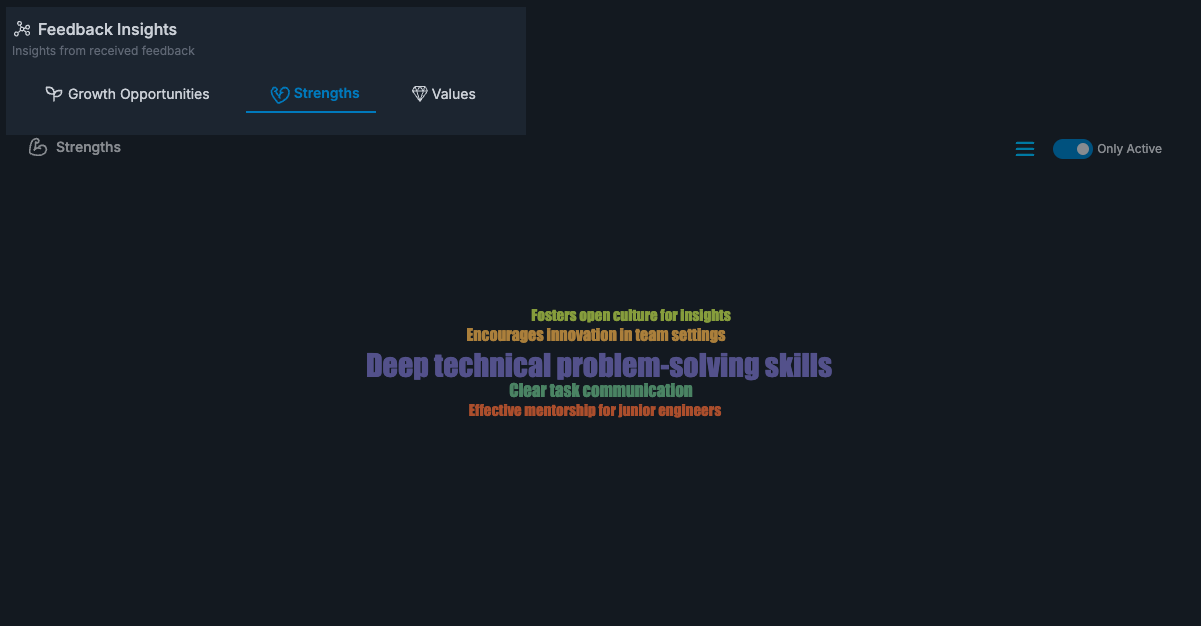
2. Strengths
Strengths surface recurring positive behaviors worth scaling. These are not "nice-to-have praise"; they are repeatable behaviors you can intentionally reinforce.
When reviewing strengths, ask:
- Which strength creates the most visible team impact?
- How can I help this behavior happen more often?
List vs Themes works the same way here:
- List = concrete strengths with evidence.
- Themes = grouped strengths showing where momentum is building.
3. Values
Values show which published company values are appearing in real feedback. This helps connect daily work behavior to the culture your team says it cares about.
How to interpret this section:
- Frequent values usually mean people are consistently recognizing those behaviors.
- Missing values can indicate either a true gap, or that value-tagging is not being used consistently yet.
If values look empty, first check whether values are published and being linked in feedback.
4. Sentiment
Sentiment answers: "How is work being experienced over time?" It is a trend signal, not a one-message verdict or a standalone performance label.
Use it well by:
- looking at direction over time (6M, 1Y, 2Y), not one isolated point
- clicking trend points to inspect the supporting evidence
- pairing sentiment with strengths/opportunities before deciding action
This keeps decisions grounded in both quality signals and context.
What hide/unhide means
Hide/unhide is a focus tool. Use Hide when a signal is not a priority right now, or when it is already being handled elsewhere.
Important:
- hiding does not delete evidence
- hiding does not erase history
- you can always review hidden items with Show All and unhide later
Creating your own Growth Opportunity or Strength
When you create your own signal, you are setting an intentional coaching lens. You are saying: "This is important enough to track, even if the system has not surfaced it yet."
This is useful when:
- you see an early pattern before it is obvious in data
- a role change introduces a new development focus
- you want to reinforce a strength intentionally, not just react to incoming feedback
Manual signals are most effective when they are specific and behavior-based (not personality labels). For example: "Improve handoff clarity in PR descriptions" is stronger than "communicate better."
From signal to action
Use this lightweight cadence every week or every other week:
- Pick one top growth opportunity and one top strength.
- Open each item and review the supporting evidence.
- Decide one concrete reinforcement action and one coaching action.
- Add both to your next 1:1 agenda.
- If needed, link recurring themes to an OKR so follow-through is measurable.
Visibility and ownership
Growth Signals are designed so coaching is collaborative, but ownership stays clear.
-
You own your personal signal set.
You can view your own signals and create/edit your own manual Growth Opportunities and Strengths. -
Your manager can coach from your signals.
Managers can view direct reports' Growth Signals to support better 1:1s and development planning. -
Workspace owners can access these views for oversight.
This supports consistency and governance across teams. -
Managers do not rewrite a direct report's personal manual entries.
They coach from signals and evidence, while the individual's owned signal record stays with that person.
This balance helps keep signals useful for development while preserving trust.
FAQs
What does sentiment measure, and is it a formal rating?
Sentiment measures how work interactions are being experienced over time. It is a coaching signal, not a standalone performance rating.
Are Growth Signals only based on explicit feedback messages?
No. They also use analyzed collaboration context and 1:1 conversation signals.
Can I manually add signals?
You can manually add your own Growth Opportunities and Strengths.
Why can I not edit or delete some items?
If an item is already linked to feedback/comments/1:1 evidence, it becomes part of signal history and is not editable/removable.
Can I hide signals I do not want to focus on right now?
Yes. Use hide/unhide controls, then use Show All when you want to review everything.
Why do values look empty?
Usually because published values are not set up yet, or values are not being linked during feedback sharing.
What if I see "Not enough signals" for sentiment?
That means there is not enough analyzed data yet for a stable trend.
Next steps: