ClarityLoop HRIS (HR+) Overview
ClarityLoop HRIS (HR+) extends your ClarityLoop workspace with the people operations tools needed to manage employees from hiring through employee exit. It stays connected to your main ClarityLoop workspace, so people, company details, and reporting relationships do not need to be maintained in two places.
HR+ syncs company details such as name, address, and logo from your main ClarityLoop workspace. Update those details in ClarityLoop workspace settings; HR+ will reflect the changes.
Where to Start
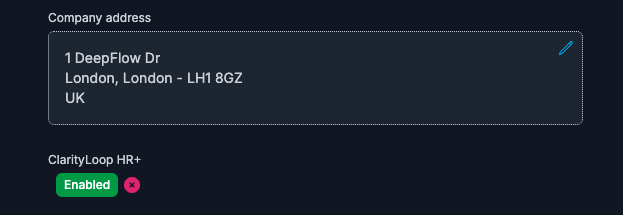
If you are setting up HR+ for the first time, start with HR+ Setup. Workspace owners need to enable HR+ from ClarityLoop workspace settings, and the company address must be added before HR+ can be activated.
After HR+ is enabled, use this overview to choose the areas your team wants to configure first.
Main Areas
- People: maintain employee profiles, work information, documents, requests, policies, and organisation context.
- Hiring: create jobs, publish roles, manage candidates, use questionnaires, email applicants, and move successful candidates toward onboarding.
- Onboarding: prepare employees through reusable processes, stages, tasks, and readiness work.
- Attendance: track time, shifts, attendance requests, hours, and exceptions.
- Time Off: configure leave types, manage balances, approve requests, and maintain holiday calendars.
- Payroll: manage contracts, allowances, deductions, reimbursements, loans, and payslips.
- Assets: track company equipment, allocations, returns, batches, and audits.
- Exit Process: coordinate employee departures through reusable processes, stages, tasks, owners, and handoffs.
- Help Desk: route internal service requests, track tickets, and maintain FAQs.
- Projects: manage projects, tasks, timesheets, and delivery work connected to employee data.
How HR+ Fits with ClarityLoop
HR+ uses your ClarityLoop workspace as the source for core company and identity data:
- company details and branding sync into HR+
- team members become employees in HR+
- team leads and reporting relationships become manager and organisation context
- users keep one ClarityLoop identity and login path
Make company-level changes in ClarityLoop first, then use HR+ for HR-specific operations such as leave policies, contracts, hiring stages, onboarding tasks, and attendance rules.
First Setup Flow
- Enable HR+ from ClarityLoop workspace settings. Workspace owners need to add the company address before HR+ can be enabled.
- Wait a few minutes while HR+ syncs company and employee data.
- Launch HR+ from the ClarityLoop header.
- Spot-check employee profiles, companies, managers, and work information.
- Configure the essentials for the areas you plan to use first, such as leave types, holidays, contracts, hiring stages, or onboarding tasks.

You do not need to configure every HR+ area on day one. Most teams start with People plus one or two operational workflows, then add more areas once ownership and permissions are clear.
What to Configure First
Most teams should review these before inviting managers or employees into HR+ workflows:
- employee profiles, managers, work information, and employee types
- holidays, company days off, shifts, and work schedules
- leave types, balances, and approval rules
- contracts and payroll settings if you plan to use Payroll
- hiring stages, hiring teams, and candidate communication if you plan to use Hiring
- Onboarding or Exit Process stages and task owners if those workflows are active
When to Contact Support
Most HR+ setup can be done directly by workspace owners or HR admins. Contact support@clarityloop.com when you need help with:
- enabling or disabling attendance tracking or check-in/check-out behavior
- payroll tax settings, filing statuses, currency formats, or payslip auto-generation
- LinkedIn, job feeds, or other hiring integrations
- third-party integrations, custom API configuration, or advanced reporting
Who Uses HR+
- Workspace owners and HR admins: configure HR+ areas, manage permissions, review sensitive data, and keep policies consistent.
- Managers: approve requests, review team records, manage hiring and employee workflow work they own, and keep operational data current.
- Employees: view their own profile information, submit requests, complete assigned tasks, and access self-service HR workflows.
Getting Help
- HR+ Setup: enable HR+ and configure the initial workspace.
- Email
support@clarityloop.comwhen you need setup help, feed configuration, or workspace-specific guidance.
HR+ scales with your organization while staying connected to your ClarityLoop workspace.