Link Goals to Evidence
Goals are easier to trust when they are connected to real signals.
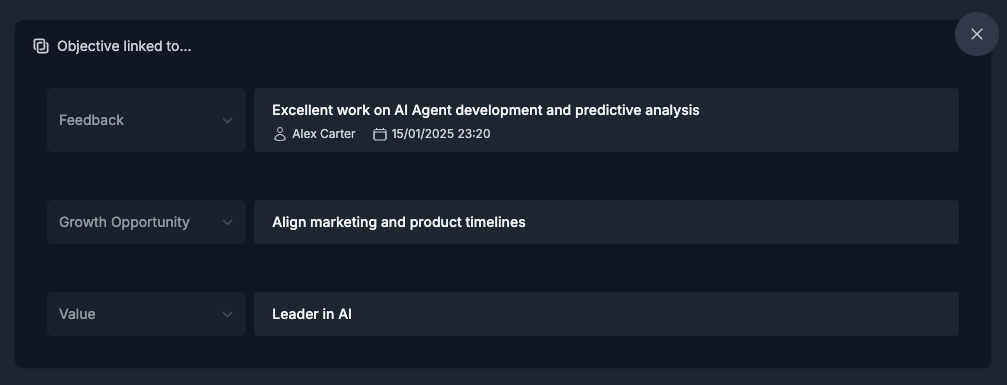
Linking gives your goal context: why this goal exists, what pattern it addresses, and what evidence supports it.
What you can link to a goal
ClarityLoop supports linking:
- Growth Opportunity
- Received Feedback
- Career Level
- Company Value
Use links to anchor your goal in real development context, not just intention.
Where linking happens
You can link goals in multiple places:
- While creating or editing a goal in the goal editor.
- From a related page (for example, feedback, values, growth opportunities) using Add to Goals.
- From link dialogs where you can choose an existing goal or create a new one.
Add comments, notes, and updates
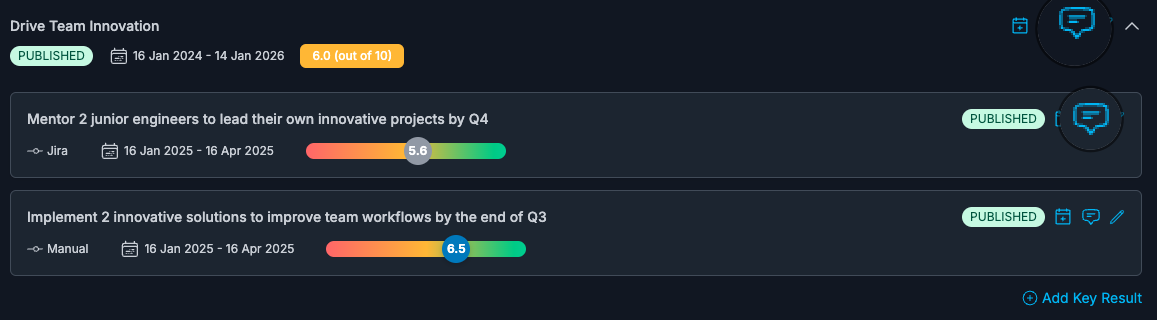
Comments keep goal conversations active between formal reviews.
You can add comments on both objectives and key results to document:
- progress updates
- decisions from 1:1s
- blockers and changes
- links and supporting context
When linking is most useful
Linking is especially helpful when:
- you want to explain why a goal exists
- you are coaching a recurring growth pattern
- you need objective evidence for calibration conversations
- you want manager and individual to stay aligned on the same context
Best practices
- Link early when creating the goal, then refine as new evidence appears.
- Keep links relevant; too many weak links create noise.
- Use comments for timeline updates instead of rewriting goal history.
- Pair linked evidence with measurable key results so action stays clear.
FAQs
Can I link context after the goal is already published?
Yes. Links and comments can be updated over time.
Can I link from work tools and Slack flows?
Yes. Use Add to ClarityLoop and then Add to Goals where available.
Do comments disappear when a goal is closed or cancelled?
No. They remain part of the goal history.
Can I still find completed or cancelled goals?
Yes. Use All in the goals list to include completed, cancelled, and ended goals.