Measure Goal Progress
Progress tracking in ClarityLoop is designed to support better decisions, not just status reporting.
When measurements are consistent, managers and individuals can coach earlier, celebrate real progress, and adjust goals before they drift.
How progress gets updated
In ClarityLoop, progress is updated in one of two ways:
- Manual updates when the goal depends on judgment, coaching context, or work spread across several inputs.
- Automatic updates when a linked delivery item in a connected system is a reliable signal of progress.
The right choice depends less on the feature and more on the nature of the outcome you are tracking.
Manual progress updates
Manual tracking is best when progress depends on judgment or mixed evidence.
How it works:
- Open the goal and the key result/action you want to update.
- Move the progress slider to reflect current progress.
- Save the update.
- Optionally add a comment to explain what changed and why.
Manual updates are available while the goal is open. If the goal is still a draft, completed, or cancelled, progress editing is disabled because the goal is not currently being tracked.
Automatic progress updates (Jira or Linear)
For delivery-focused tracking, you can auto-update from:
- Jira
- Linear
- Forecast
Choose the measurement source in key result/action settings, then link the issue. ClarityLoop uses that linked source for ongoing progress updates.
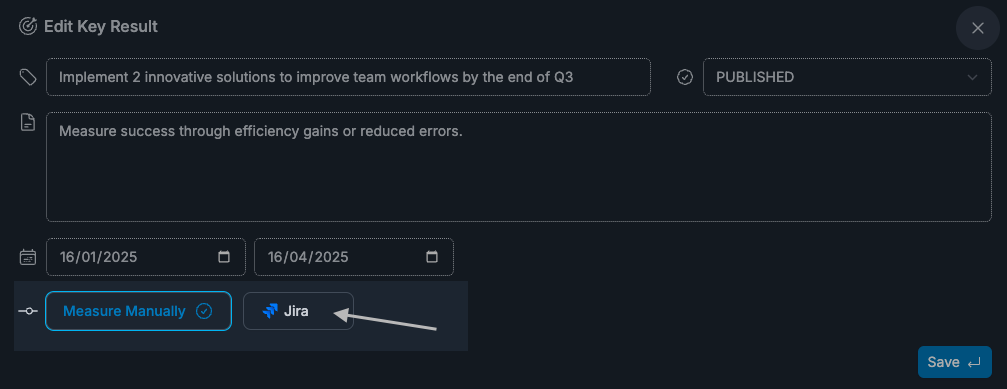
This works best when the linked Jira or Linear or Forecast item is a strong representation of the outcome you are measuring, not just one small task within it.
Choosing manual vs auto
Use Manual when:
- the outcome is behavioral or cross-functional
- progress is not represented by a single issue
- coaching judgment matters more than ticket state
Use Jira/Linear/Forecast auto-update when:
- the outcome maps cleanly to delivery workflow
- issue status is a reliable proxy for progress
- you want lower maintenance overhead
How goal progress is calculated
Goal progress rolls up from the linked key results and actions underneath it. In most cases, you update the underlying items rather than the goal directly.
That means:
- if one action moves forward, the goal reflects that movement
- if several items are linked, the overall goal view becomes more representative over time
- if you mark a goal complete, ClarityLoop treats that goal as complete in summaries
- comments on progress updates help explain why the number changed, not just that it changed
If a goal has no key results/actions yet, there is no item-level progress to roll up. If the work itself is already done, use Complete from the goal card menu instead of adding a placeholder item just to move the score.
How the progress value works
Progress is shown as a percentage in the product:
0%means not started50%means meaningful in-progress movement100%means complete
Treat it as a practical progress signal rather than a precise scoring exercise. What matters most is consistent updating and clear supporting context.
What if progress cannot be edited
Common reasons:
- the goal is still a draft
- the goal has been completed or cancelled
- measurement type is auto-update (Jira/Linear), so direct slider edits are disabled
- integration is not connected for the selected source
Ended goals stay available under All, but they are no longer shown in the default Open view.
Manager view and collaboration
Managers can review goal progress for direct reports in one place from the Team area.
This makes it easier to:
- scan progress across goals without opening multiple tools
- spot stalled items early
- discuss progress trends in 1:1s with shared context
- coach on next steps while goals are still active
The goal is not just oversight. It is faster, more useful coaching with the same evidence both people can see.
Best practices
- Update at a regular cadence (weekly or biweekly works well).
- Pair score updates with short comments for context.
- Discuss trend direction in 1:1s, not just the latest number.
- Avoid inflating scores early; keep measurement consistent across cycles.
FAQs
Can I switch measurement type later?
Yes. You can edit the key result/action and change its measurement method.
Can I open the linked Jira or Linear issue from the goal?
Yes. Auto-tracked items include an Open issue action.
Does auto-update require setup?
Yes. The relevant integration must be connected, and some workspaces may have plan-based limits.