Line Report Details
This is where signals become decisions.
When you open a direct report from Team Dashboard, you are no longer looking at team-level patterns. You are now looking at one person’s real coaching context: meetings, follow-through, goals, feedback evidence, and growth themes.
How to open it
Open Team Dashboard, then select a person from Your Team or from the team charts.
What makes this page valuable
The top of the page gives you immediate context and immediate action: you can check sentiment trend, open progress history, and take next-step actions without switching surfaces.
In practice, this means less managerial delay: you do not have to gather data first and act later. You can understand and act in the same session.
How to use the tabs with purpose
Meetings & Actions: execution truth
This is where intent meets reality. You can see upcoming events, create structured 1-1s/meetings, and track whether actions are actually moving.
Use board/list views and filters when you need to answer: "Are commitments being completed, or only discussed?"
Goals: direction and momentum
This view helps you evaluate quality of focus, not just goal count. You can search goals, switch between Open and All, filter by quarter, read progress movement, export the current page, and add or refine goals.
If goals are drifting, this tab usually shows it before performance conversations do.
Feedback Requested by You: signal quality
Use this tab to track how well you are collecting relevant input about the person. You can monitor response coverage, see request status, and nudge pending recipients when needed.
When this loop is healthy, coaching gets specific faster.
Received Feedback: evidence for coaching
This is where you ground conversations in concrete examples. You can filter by sender, quarter window, and anonymous-only signals; switch between list and trend views; and connect feedback directly to agendas and goals.
If you need to move from "general concern" to "clear coaching," this is usually the best starting point.
Growth Signals: recurring themes
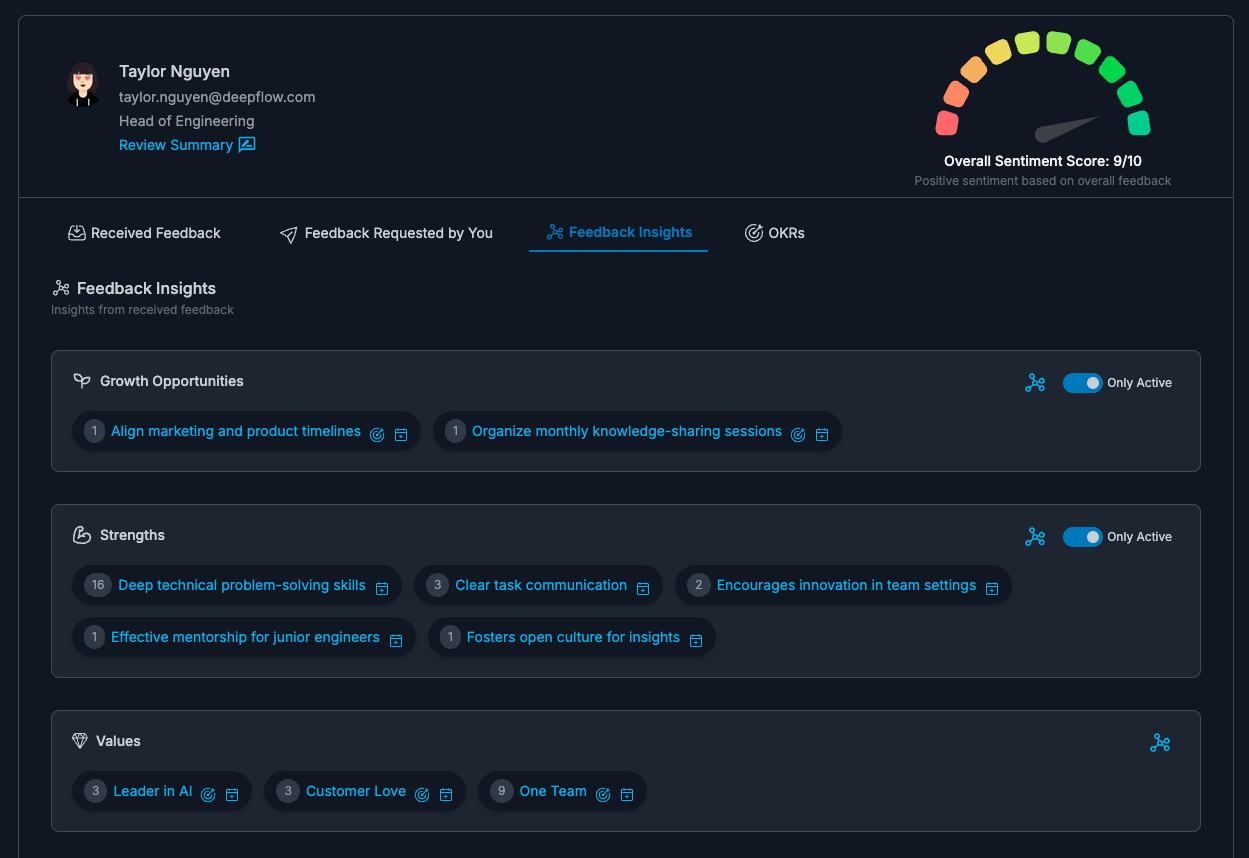
This view surfaces recurring strengths, growth opportunities, values, and sentiment movement. You can switch list/theme modes to spot patterns quickly, then open details for deeper context.
These signals are AI-assisted from feedback, 1-1 context, and work threads, so they reflect patterns over time instead of one-off moments.
A practical coaching loop on this page
- Check sentiment and recent feedback direction.
- Validate with goal movement and action follow-through.
- Capture one clear next step (agenda item, feedback request, or goal refinement).
FAQs
Is this page only for review season?
No. It is designed for weekly or biweekly coaching cadence.
Where do deeper historical trends live?
Open View Progress Summary from this page.
How do I avoid over-coaching from noise?
Use this page to confirm patterns across feedback, goals, and actions before making major conclusions.