Customize reports
Custom reports let leaders, HR, and managers define the exact pattern they want to monitor, then surface matching people in the selected reporting line.
These reports are useful when you already know the kind of pattern you want to watch for, but you do not want to rebuild that lens every week.
Open report builder
Go to Leadership Insights. Then choose:
- Add to build a report from scratch
- Pick from Library to start from templates
Reports are only visible to you.
Start with a clear management question
The best reports are built around one leadership question, not around every metric you can add.
Good examples:
- Who may be emerging faster than expected?
- Who may be drifting without enough support?
- Who is contributing disproportionately to coaching and culture?
If one report is trying to answer recognition, risk, and readiness all at once, it usually becomes noisy.
Use templates when the question is familiar
Built-in templates include:
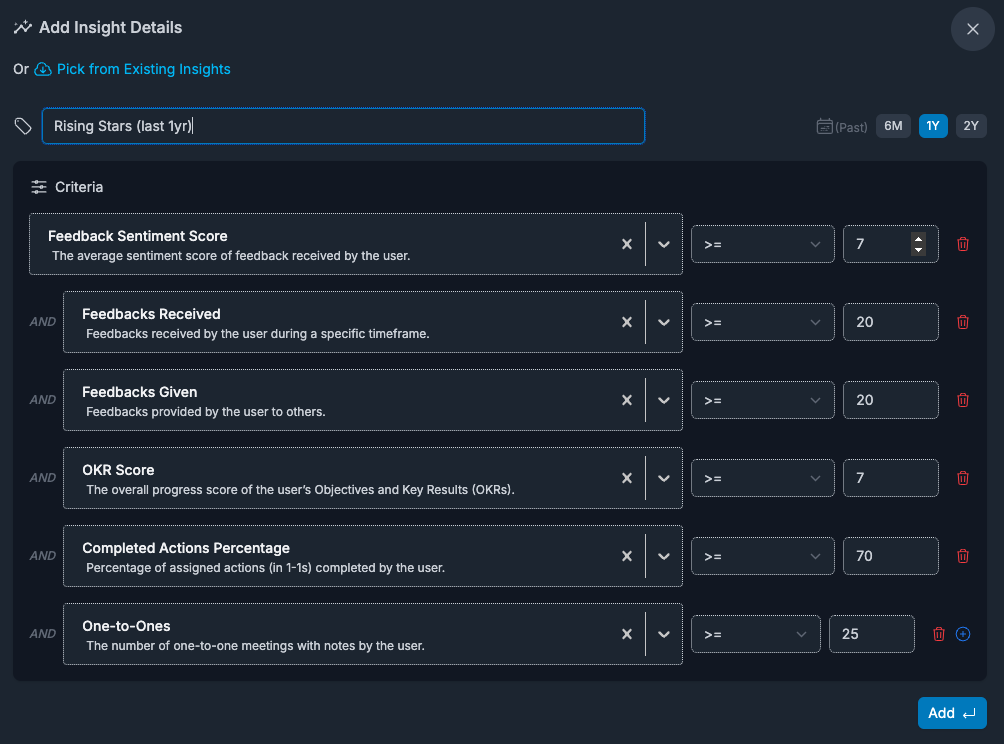
- Rising Stars
- Attrition Risks
- Potential Leaders
You can use them as-is, then adjust filters and thresholds for your team context.
For workspace owners, this is a fast way to apply the same lens across different reporting lines one by one.
Build your own report when context matters more
Each report includes:
- report name
- time window: 6M, 1Y, or 2Y
- one or more criteria combined with AND logic
Available criteria fields
- Feedbacks Received
- Feedbacks Given
- Feedbacks Given with Growth Opportunities
- Sentiment Score
- Goals Score
- Completed Actions Percentage
- Current Level
- Structured 1-1 checkins
- Promotions
Operators and limits
- operators:
=,>=,>,<=,< - numeric values only
- up to 9 criteria per report
- duplicate criteria pair (same field + same operator) is blocked
- field values are validated by metric range (for example Sentiment/Goals 0-10)
Use fields as signals, not labels
- Feedbacks Received: who is getting enough input from others
- Feedbacks Given: who is contributing feedback to the wider team
- Feedbacks Given with Growth Opportunities: who is giving actionable developmental feedback
- Sentiment Score: how a person is being experienced across analyzed signals
- Goals Score: progress across goals in the selected period
- Completed Actions Percentage: follow-through on 1-1 action items
- Current Level: assigned numeric framework level or level sequence, not job title
- Structured 1-1 checkins: regularity of documented 1-1 cadence
- Promotions: promotion count in the selected timeframe
The value comes from the combination, not from any one field in isolation.
Read results and act
When you expand a report, you get matching team members for the selected reporting line. Click a person to open their line report details and continue with coaching actions.
If you are a workspace owner and have not selected a lead yet, results will stay empty until a reporting line is selected.
The report surfaces candidates for attention. The next step is checking person-level context before you act.
Edit or remove reports
You can edit name, timeframe, and criteria anytime. You can also delete reports you no longer need.
Non-obvious tuning tips
- If results are too broad, tighten thresholds first before adding more criteria.
- If results are empty, widen timeframe (for example 6M -> 1Y) or soften one threshold.
- Use one report per decision type (risk, recognition, readiness) to avoid mixed signals.
- Remember that every condition is combined with AND logic, so a few strict thresholds can narrow results very quickly.
Good report design patterns
- Recognition: high sentiment, high goal progress, strong feedback activity
- Risk: low sentiment, low goal progress, weak follow-through, sparse 1-1 rhythm
- Readiness: strong sentiment, strong delivery, higher current level, visible coaching contribution
Keep each report tied to one decision type. Mixed-purpose reports usually become noisy.
Common report mistakes
- using too many conditions before you know what "normal" looks like
- treating one metric as a verdict instead of a clue
- setting thresholds so tight that nobody qualifies
- building a report around a label like "top performer" without defining what that means in measurable terms
Plan limits
On the Community plan, you can keep up to 2 insight reports. On Professional, report creation is not capped by that limit.
FAQs
Can other leaders see my reports?
No. Reports are personal to the creator.
Why does a report show no results even though the logic seems valid?
Usually because the thresholds are too strict, the timeframe is too narrow, or a workspace owner has not selected a reporting line yet.
Can I build a report without naming it first?
No. Name, timeframe, and at least one condition are required.