Focus areas
Focus Areas help workspace owners see where coaching demand is clustering across a reporting line or, in company scope, across the wider organization.
Instead of reacting person by person, you can prioritize the themes that need coordinated leader attention.
Who this is for
Focus Areas is available to workspace owners inside Leadership Insights. Managers can still use Leadership Insights, but Focus Areas itself is owner-facing.
How focus areas are generated
Focus Areas are generated from analyzed activity across the selected reporting tree and timeframe. Each theme reflects combined signal volume from feedback, comments, and meeting/event context.
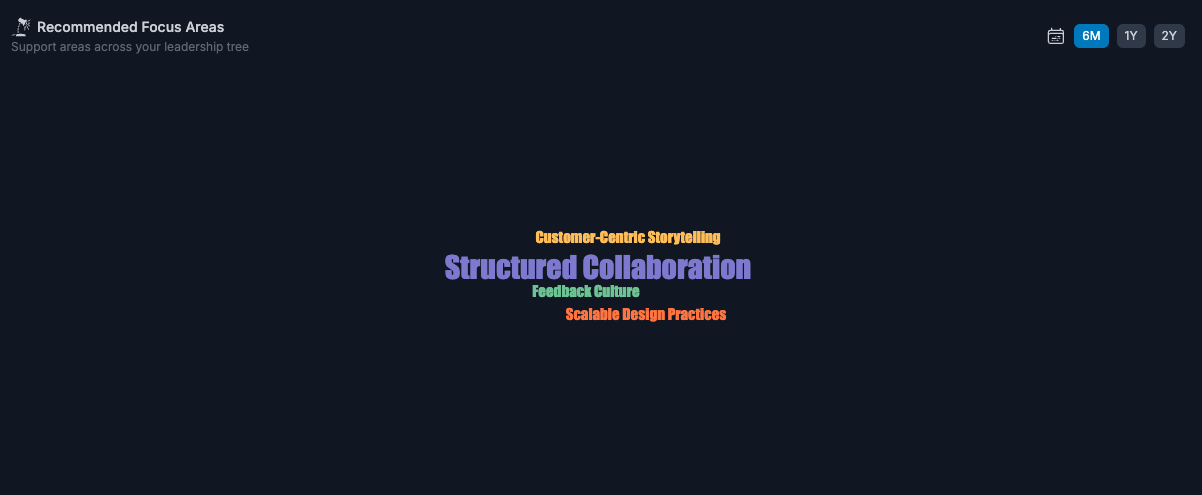
They help reduce many person-level signals into a smaller set of themes leaders can discuss and act on.
Use the timeframe intentionally
Switch between 6M, 1Y, and 2Y:
- 6M for current coaching pressure
- 1Y for medium-term consistency
- 2Y for deeper recurring patterns
Use list vs themes intentionally
- List view makes it easier to scan individual focus areas with their counts and descriptions.
- Themes view uses the word cloud to help you spot the biggest recurring patterns quickly.
Both views show the same underlying focus areas. They just optimize for different reading styles.
Drill down to associated growth opportunities
Click any focus area in the word cloud to open its detail view. From there, you can review associated growth opportunities and open the underlying line-report growth opportunity directly.
This keeps the flow practical:
- theme at team level
- evidence at individual level
- coaching action in context
If you are in company scope, you can review the theme at company level first. To open the related growth opportunities, select a leader scope.
The focus-area cards and details also show where the signal is coming from, including:
- feedback
- comments from connected work context
- 1-1 or meeting-event signals
When Focus Areas adds the most value
Use Focus Areas when you are asking:
- What is repeating across this leader tree?
- Where do leaders need a shared coaching response?
- Which theme is large enough to address at a manager or org level, not just person by person?
It is less useful when you need to understand one individual deeply. In that case, open the person-level context.
Important but easy to miss
- Focus areas are system-generated and dynamic; you cannot manually create or rename them.
- Bigger words usually mean more signal volume, not necessarily higher business impact.
- Focus areas are AI-assisted summaries of recurring growth themes, not standalone decisions.
- This view is strongest when used with sentiment and goal trend checks before deciding interventions.
What to do with focus areas in practice
- Pick one theme to reinforce and one to coach this cycle.
- Use these themes in leader 1-1s and manager coaching cadences.
- Track whether sentiment, goal scores, and action completion improve.
Common mistakes
- treating the biggest theme as automatically the most important theme
- acting on the label without checking the underlying growth opportunities
- using company scope when you really need manager-level action detail
- using Focus Areas alone without checking sentiment, goals, or person-level evidence
FAQs
Can I manually create focus areas?
No. Focus Areas are system-generated from real signals.
Why is the focus area cloud empty?
Usually because the selected reporting tree or timeframe does not yet have enough signal density.
Why can I see a focus area but not its related growth opportunities?
Growth opportunities are shown in leader scope. If you are in company scope, select a leader to drill down further.