Complete reviews
This guide is for individual contributors, managers, and panel members completing review stages.
The goal of a strong review response is not to write the longest answer in the room. It is to give clear, useful evidence that helps the final decision feel fair, informed, and easy to trust later.
Where your review work appears
Go to Performance Reviews.
You will see:
- Self Review
- Team Reviews (if you manage direct reports)
- Panel Reviews
In each cycle, people are rows and stages are columns, with state indicators:
Not StartedIn ProgressCompletedMissed
Each view is tailored to your role, so you are not hunting through unrelated work to find what matters.
Understand when you can act
Per stage, you may see:
- Start Review
- Continue Review
- View Review
In sequential timing, later stages open as earlier stages complete/close. In all-at-once blind timing, stages are open in parallel, but you cannot view others' submitted responses until you submit your own stage response.
If you are wondering, "Why can I not see the other responses yet?", this timing model is usually the reason.
Start with context before opinion
Before answering, use the context available in review workspace:
- View Progress Summary to ground your response in ongoing growth/performance signals
- View Full Profile (manager/owner context) when deeper history is needed
- Perception score to notice sentiment patterns over time
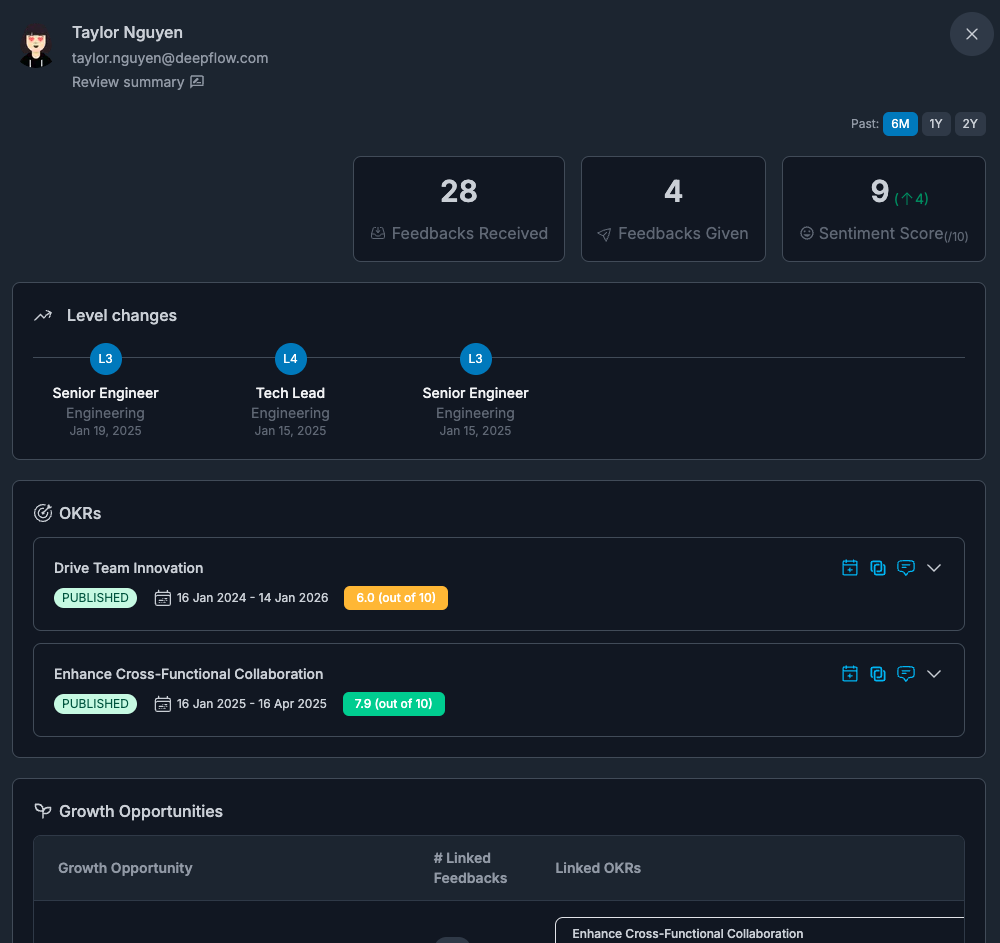
This helps you avoid recency bias and “memory-only” judgments.
Build high-quality answers quickly
ClarityLoop supports structured and narrative evidence in the same stage.
You can:
- answer rating/choice questions for comparability
- add free text rationale for context
- attach context links to support written responses
- use AI refine to improve clarity/tone while preserving meaning
Drafts autosave while you work.
That means you can get your ideas down first, then polish them without losing the substance.
Know what "good" looks like by reviewer type
Self review
Self reviews work best when you:
- highlight meaningful wins, not every task you touched
- explain what changed, what you learned, and where you still want support
- use specific examples instead of broad claims like "I worked really hard"
Manager review
Manager reviews work best when you:
- anchor comments to repeated patterns, not one memorable week
- separate observed behavior from interpretation
- balance decision clarity with coaching usefulness
- use context from goals, feedback, and progress summary before scoring
Panel review
Panel reviews work best when you:
- comment on the work you actually observed
- stay in your lane instead of trying to evaluate everything
- add concrete examples the manager may not have seen
- avoid "sounds good to me" style answers that create noise without evidence
Sensitive questions may not be visible to everyone
Some questions are intentionally configured with tighter visibility:
- Standard
- Reviewer only
- Reviewer + reviewee's manager
So if you cannot see every answer in a review packet, that is often by design, not a bug.
Panel selection
If the cycle uses choose-later panel assignment, eligible users will see Select panel or Change panel.
That control appears inside the relevant Panel stage for that person while you are completing the review, not in a separate setup page.
Select panel members before the stage closes. Otherwise, the panel may not have enough time to submit, even if stage design is good.
Depending on the cycle design, panel selection may be done by:
- the manager
- the reviewee
- either the manager or the reviewee
If you have permission to choose the panel, do it early. Waiting until the last minute compresses the panel's deadline window.
Submission, lock, and reopen logic
Submitting moves your response into a locked state by default.
Two workflows can reopen editing:
- Owner requests changes: owner reopens and asks for updates
- Reviewer requests reopen: reviewer asks, owner approves, then reviewer edits/resubmits
These controls exist so quality can improve without side-channel workarounds.
In practice:
- if your answer needs clarification, an owner can request changes
- if you realize you made a mistake after submitting, you can request a reopen
- once approved, you can edit and submit again
That keeps the record clean instead of moving the real conversation into chat or email.
What happens if time runs out
If a stage closes before submission, status becomes Missed and editing is blocked unless reopened through owner controls.
Reviewer habits that improve fairness
- anchor claims to specific work examples
- separate observed behavior from interpretation
- use concise language so decisions are easy to review later
- submit on time so calibration includes complete evidence
FAQs
Can I save without submitting?
Yes. Drafts autosave while you work.
Why is my review locked after I submitted it?
Submitted responses are locked by default. That protects review integrity and keeps the process auditable.
What if I need to change something after I submit?
Request a reopen. An owner can approve it, or they can request changes directly.
Why can I not see another reviewer's answers yet?
If the cycle is using blind parallel timing, reviewers cannot see others' submitted answers until they submit their own.
Can owners see more than reviewers do?
Yes. Owners operate the review process and can inspect results more broadly, while some question-level visibility rules still stay restricted for everyone else.
Next steps: